
TL;DR
- A tech stack is the specific set of tools, languages, and services used to build and run a single app. Every app has one, even if you never picked it on purpose.
- Most stacks have four layers: frontend (what users see), backend (the logic), database (where data lives), and infrastructure (where it runs).
- You will hear names like LAMP, MEAN, and MERN. These are just shorthand for a bundle of tools, not a verdict on quality.
- AI builders like Bubble choose the stack for you. That is speed, but the catch is real: outgrowing a no-code app can cost $50,000 to $250,000 to rebuild, and the true cost often runs 3 to 5x the sticker price.
- The 80% problem: AI tools build the first 80% fast, but the last 20% (custom logic, scale) can force a full rebuild.
- Choose a proven open-source stack (MERN or LAMP) for long-term control; choose a no-code AI builder for speed, but know the rebuild cost before you commit.
👉 Skip the guesswork: MoreMagpie shows you how a tool stack fits together and surfaces options you didn't know to ask for, join the waitlist.
Wait, What Exactly Does "Tech Stack" Mean?
You describe your idea. Someone (or some AI) says "we'll build it on a MERN stack." You nod.
But you have no idea what you just agreed to.
That is the most common moment for a non-technical founder. A decision gets made in week one, in a language you don't speak, and it quietly shapes your costs and hiring for years.
Most guides on this topic assume you are about to become a developer. This one doesn't. It assumes you are shipping with AI tools and no-code builders, and you want to understand your options before you commit.
Here's what we'll cover:
- the plain-English definition
- the four layers explained
- real stack examples
- AI builders and the hidden catches
- how to choose without a developer
What Is a Tech Stack, Exactly?
A tech stack is the specific set of tools, languages, and services used to build and run a single application. Every app has one, even if you never chose it consciously. It is called a stack because you can picture the technologies layered on top of each other, from what the user sees down to where the data lives.
That is the whole idea. A list of parts that work together.
Here is where beginners get tangled, so let's untangle it in plain English.
Tech stack: the specific bundle of tools used to build something. For example, React plus Node.js plus PostgreSQL.
Platform: a broader environment you build on top of, such as Shopify, Salesforce, or WordPress. It usually comes with a stack already built in.
Framework: one tool inside a stack. React is a framework, a single piece of a frontend stack, not the whole thing.
So a framework sits inside a stack, and a stack can sit on top of a platform. (Documented, from cloudmotiv.ai.)
The reason this matters: when you understand a stack instead of just accepting a list of names, you can actually judge whether it fits your idea. That is the whole point of knowing the term.
The Four Layers of a Tech Stack (And What Each One Does)
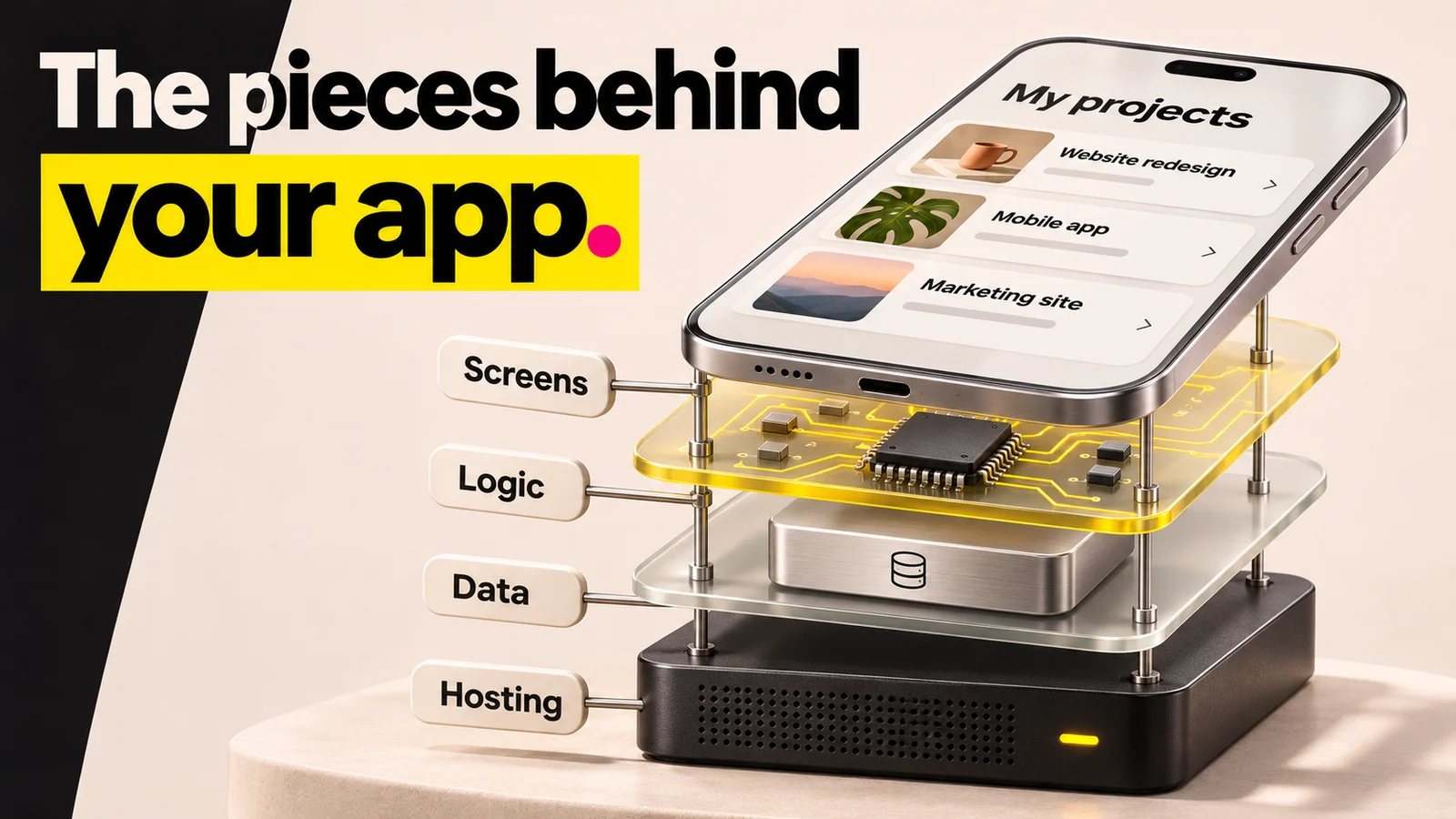
About this illustration
AI-generated editorial illustration. A visual metaphor for software layers, not a literal phone assembly or a required hardware purchase.
Most tech stacks break into four layers. Each one does a different job.
Frontend: what users see and click. The buttons, the screens, the colors.
Backend: the logic that makes things happen when someone clicks. The rules and the plumbing.
Database: where your data lives. User accounts, orders, messages.
Infrastructure: where the whole thing runs and how it gets online. The hosting and the glue.
Think of it like a restaurant. The frontend is the dining room. The backend is the kitchen. The database is the pantry. The infrastructure is the building and the power.
Here are the four layers at a glance, with example tools for each.
| Layer | Plain-English Job | Example Tools |
|---|---|---|
| Frontend | What users see and click | React, Next.js, HTML/CSS |
| Backend | The logic that makes things work | Node.js, Python, PHP |
| Database | Where your data lives | PostgreSQL, MySQL, MongoDB, Supabase |
| Infrastructure | Where the app runs and how users sign in | AWS, Vercel, Railway, Clerk (for auth) |
Web stacks often combine tools like Next.js, Supabase, and Clerk. The job of understanding a stack is seeing how those pieces connect, not memorizing the names.
Named Tech Stacks You Will Actually Hear About
Some stacks are so common they got nicknames. You will hear these in developer conversations and AI tool docs. Here are the three big ones.
LAMP stands for Linux, Apache, MySQL, and PHP. It is one of the oldest and most battle-tested web stacks. In practice, that means decades of community knowledge and a huge talent pool to hire from.
MEAN stands for MongoDB, Express, Angular, and Node.js. It uses JavaScript across the whole stack, so one language runs front to back.
MERN stands for MongoDB, Express, React, and Node.js. It is MEAN with React swapped in for the frontend. (Documented, from MongoDB and Couchbase.)
Now the question beginners always ask: is Python a tech stack?
No. Python is a programming language, one tool that lives inside a stack, usually in the backend layer. Same logic applies to React or MySQL on their own. A single tool is an ingredient. A stack is the recipe.
So when someone drops a name like MERN, they are not making a quality claim.
They are just naming the bundle. The name is shorthand, not a verdict.
What AI Builders and No-Code Tools Change (And What They Don't)
Here is the part the classic explainers skip.
Tools like Bubble, Base44, Replit, and Lovable hand you a stack that is already chosen. You describe your idea, and it ships something. You never saw the stack decision, because the tool made it for you.
That is genuine speed. But the stack choice did not disappear. You just didn't make it consciously.
And the catches are real.
The 80% problem. These platforms build the first 80% of your app remarkably fast. But the last 20%, the custom business logic, the complex integrations, performance at scale, can be impossible or require a complete rebuild on traditional infrastructure. (Documented, from kunalganglani.com.)
Vendor lock-in. This may be the most consequential hidden cost. Bubble apps cannot be exported as standalone code. Rebuilding a no-code app that has outgrown its platform costs $50,000 to $250,000, plus six to twelve months of development time. (Documented, from devlabs.angelhack.com.)
Scaling costs. Bubble Web Starter was listed at $32 per month billed annually in the captured November 6 offer, with workload limits rather than a guaranteed number of users. But scaling to thousands of active users can push monthly costs to $1,500 to $10,000 or more. (Documented, from devlabs.angelhack.com.)
The real sticker price. When you add the extras, the true number is often 3 to 5x the AI builder's advertised price. (Documented, from rationalgo.ai.)
None of this means AI builders are bad. It means the stack they picked for you comes with trade-offs, and you deserve to see them before you build, not after.
This is exactly the gap MoreMagpie is built to close. For every suggested tool or approach, it aims to show what it does, why it helps, how it connects to the rest, and the costs, limits, and questions still to answer. Honest framing, not a sales pitch.
How to Choose a Tech Stack When You're Not a Developer
You do not need to pick the exact tools yourself. But you do need to understand three things before you approve a stack.
Speed versus control. No-code and AI builders win on speed. Open-source stacks like MERN or LAMP win on control and long-term cost. Decide which one your idea actually needs right now.
The talent pool. Can you hire someone to work on this later? Proven tech like React, Node, PHP, Python, MySQL, and PostgreSQL has massive talent pools and years of community knowledge. Pick a stack only you understand, and you have painted yourself into a corner.
Lock-in risk. Ask one question: if this platform disappeared tomorrow, or got too expensive, what would it cost me to leave? Remember the $50,000 to $250,000 rebuild figure.
The boring truth: stack decisions made in week one affect hiring, cost, and velocity for the next 3 to 5 years. (Documented, from devshire.ai.) That is why "boring, proven tech" beats the newest, shiniest option for most founders.
One more reality check. The average small business with 500 or fewer employees already runs 172 apps, and IT uses only 18% of them while paying for 31% of the spend. (Documented, from creditforstartups.com.) Complexity creeps in fast. A stack you understand keeps it in check.
This is where MoreMagpie fits. Instead of accepting the first answer an AI gives you, it surfaces alternative approaches you might never have found, and shows how a tool stack fits together. You keep your usual AI builder. You just bring it a better brief, with choices you actually understand.
Frequently Asked Questions
What is a tech stack?
A tech stack is the specific set of tools, languages, and services used to build and run a single application. It usually has four layers: frontend, backend, database, and infrastructure. The name comes from picturing those technologies stacked on top of each other, from what users see down to where data lives.
What's the difference between a tech stack and a framework?
A framework is one tool inside a stack, not the whole thing. For example, React is a frontend framework, a single piece of the puzzle. A tech stack is the full bundle of tools working together, such as React plus Node.js plus PostgreSQL. One framework, many pieces, equals a stack.
What is an example of a tech stack?
A classic example is LAMP: Linux, Apache, MySQL, and PHP, one of the oldest and most proven web stacks. Another is MERN: MongoDB, Express, React, and Node.js, which uses JavaScript across the whole app. Both are bundles of four tools, one per layer, working together.
How do I choose the right tech stack?
Weigh three things: speed versus control (no-code is fast, open-source gives control), the talent pool (can you hire for it later?), and lock-in risk (what would it cost to leave?). Proven tech like React, Node, and PostgreSQL is usually safest, since stack choices shape costs for 3 to 5 years.
Is it ever worth using a no-code or low-code platform instead of a custom stack?
Yes, for speed and early validation. No-code tools ship a working app fast without a developer. The catch: the 80% problem means the final 20% can force a rebuild, and vendor lock-in can cost $50,000 to $250,000 to leave. Use it to test, but know the exit cost.
Putting It Together: What You Actually Need to Walk Away With
A tech stack is not just a developer's concern. It is a founder's decision that shapes your cost, your hiring, and your speed for years.
You do not need to pick the tools yourself. But you do need to understand what was chosen and why, so you are nodding along with knowledge, not just politeness.
The honest reality: every stack has trade-offs, and the AI builder that picked yours probably did not show them to you.
That is what MoreMagpie is for. It helps non-technical founders and AI builders see how a tool stack fits together, discover options they didn't know to ask for, and carry a clearer plan into their usual builder. Join the waitlist to turn your idea into choices you actually understand.